 Greek
Greek
Overview
An API (Application Programming Interface) is a set of URLs (called endpoints) that allow any user to interact with a system programmatically by sending HTTP requests to access and manage data.
An API Key is a credential used to authenticate and authorize access to APIs.
The APIs described in this guide allow enterprise-grade operations within our system, such as certificate bulk issuance, data retrieval and request management. Any requests made to our system must include an API key in the X-API-Key HTTP header for secure authentication. All our endpoints return data in JSON format.
Create API Keys
1. Log in to HARICA CertManager
Visit HARICA’s CertManager and sign up to create your account. Fill in all the necessary fields.
Your personal information must be accurate and fully matched (letter-by-letter) with a government-issued identification document.
2. Enable Two-Factor Authentication (2FA)
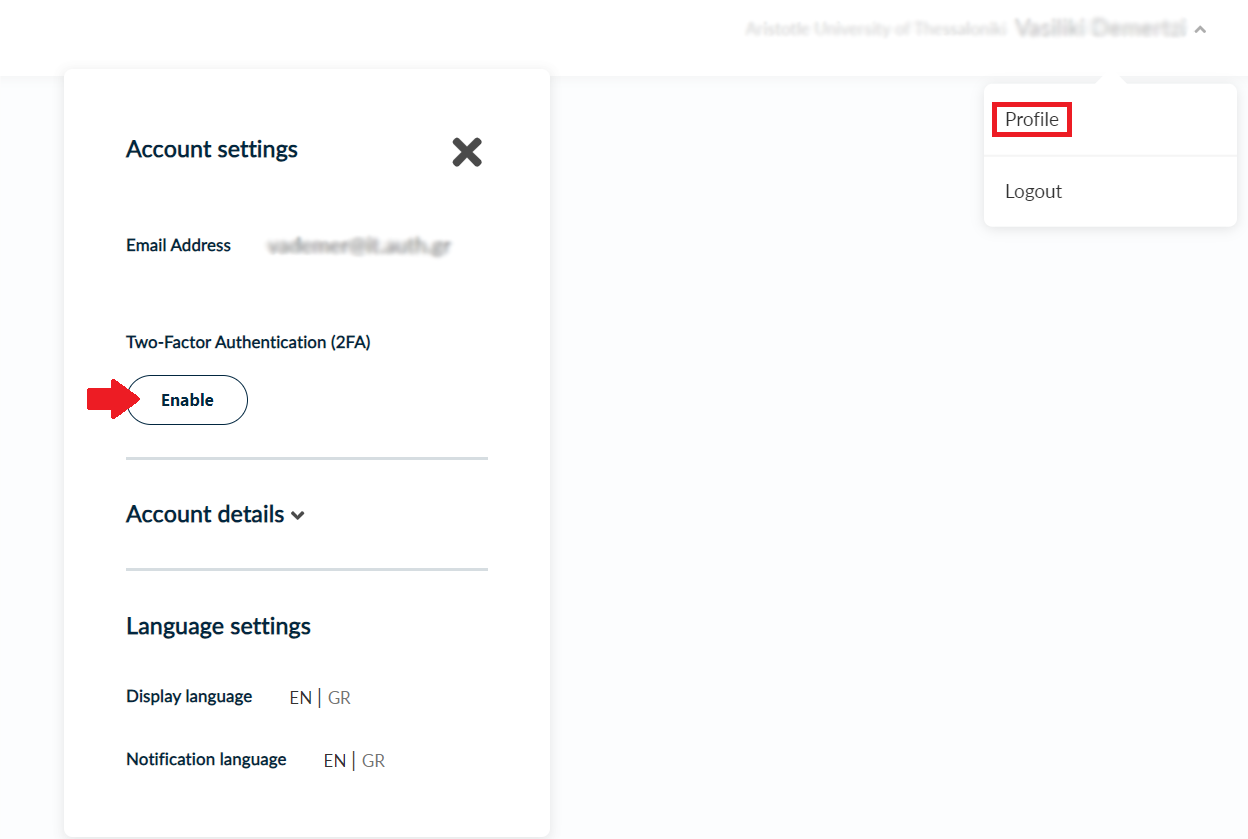
Once you log in, from the top right corner, click on your name and select Profile. From the Account Settings menu, click Enable and follow the on-screen instructions to activate Two-Factor Authentication (2FA) as it is required for granting access to roles and API Keys.
3. Get the appropriate Access Role
After the process is completed, please inform the Enterprise Manager or an already assigned Enterprise Admin of your Enterprise in order to grant you access as an Enterprise Admin or Enterprise Approver.
Specifically, there are three Enterprise Approver roles, which are Enterprise SSL Approver, Enterprise S/MIME Approver and Enterprise Client Auth Approver.
4. Create an API Key
Once you have been assigned a role, select the Profile tab again. Now, you will be able to see the option to create an API key. Click Create to generate your API key.
Please note that each user can create a maximum of 3 API Keys.
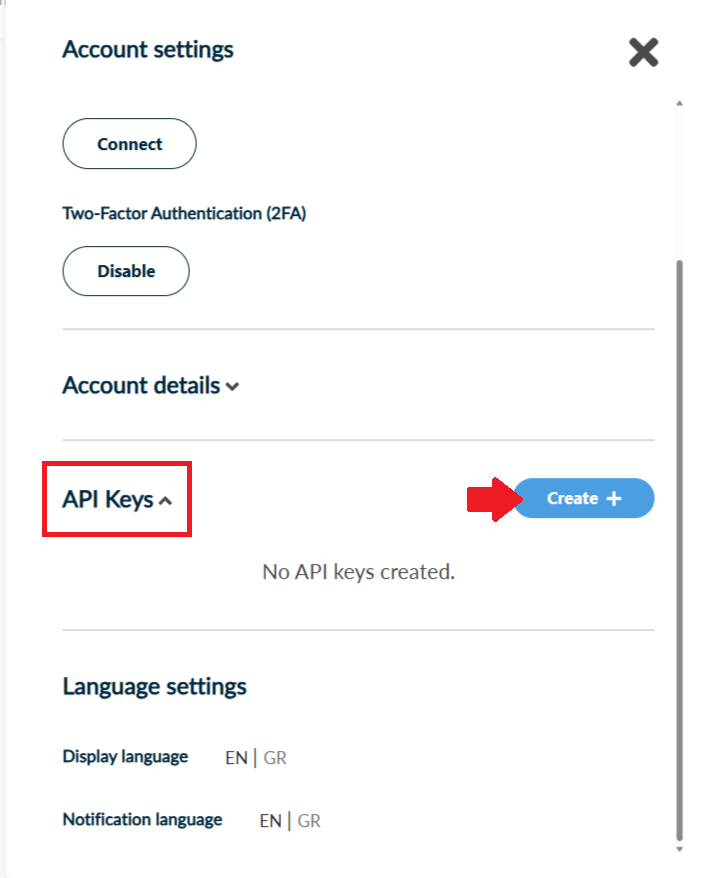
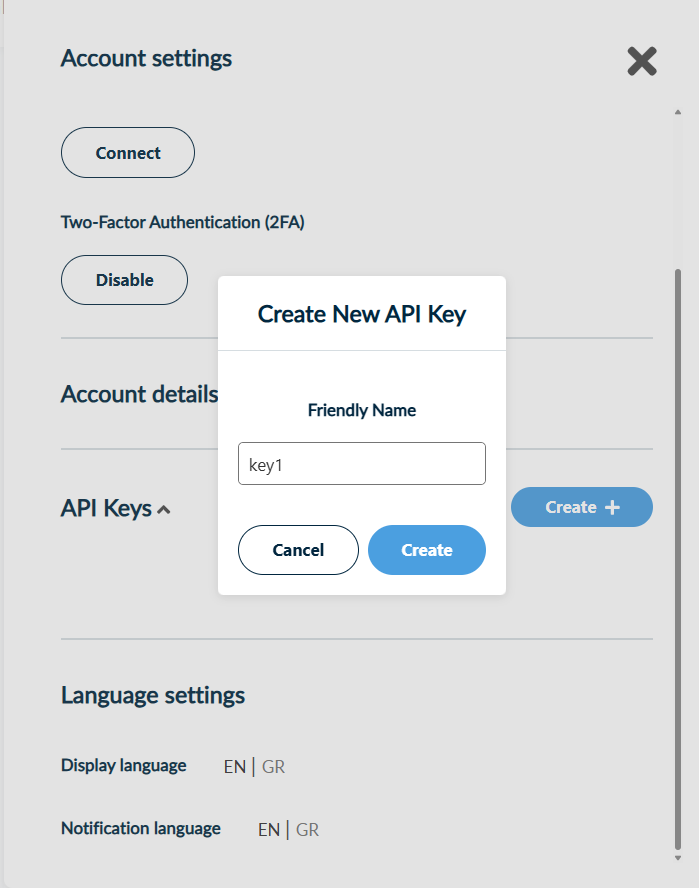
Give your API Key a friendly name. Click Create.
Save the code for the API Key.
CAUTION! Please note that, this is the only time you'll be able to view your API Key code. Make sure to copy and save it securely before checking the boxes below.
Requirements for every request
Role
This integration supports only users assigned the Enterprise Admin or Enterprise Approvers (SSL, S/MIME, Client Auth) role.
Base URL
The base URLs, depending on HARICA’s environment, are the following:
- Development: https://cm-dev.harica.gr.
- Staging: https://cm-stg.harica.gr
- Production: https://cm.harica.gr
Header
Every request requires the X-API-Key HTTP header containing a valid API key (see section Create API Keys).
The POST requests also require the HTTP header Content-Type.
There are two endpoint styles:
- Form Data – for file uploads (e.g. CSV for Bulk Issuance) The Content-Type header must have the value multipart/form-data
- Boby Data – for actions via structured JSON requests The Content-Type header must have the value application/json
Response
Most responses are provided in JSON format. The only exception is Bulk Issuance where responses are provided in ZIP format.
Path Parameters
The following endpoints support only predefined action values and, where required, predefined type values. Invalid values result in an error.
Bulk Certificate Issuance
Bulk issuance allows creating multiple certificates (of type S/MIME or Client Authentication) in a single request by uploading a CSV file.
The request for bulk issuance is made using the POST method to the API endpoint /cm/v1/bulk/create/{type}
Only users assigned the Enterprise Admin role can access this endpoint.
You must fill in the type path parameter depending on what type of certificates you want to issue. The supported values are smime and clientauth.
For this endpoint the Content-Type header must have the value multipart/form-data.
The required form fields are value and file.
The value field must contain your organization id which can be retrieved from the GET Enterprises endpoint (see below the Get Data section). If your account is associated with multiple enterprises, input the id of the organization on whose behalf you are issuing the certificates.
In the file field you have to submit the csv file containing the necessary information for the certificates.
The response is a zip file containing the certificates. In case of an error, a JSON containing the action outcome (status, error message, etc.) will be returned.
Client Authentication
If you want to issue Client Authentication certificates (clientauth) the submitted csv file should have the following columns:
| Column | Required | Description |
|---|---|---|
| CommonName | Yes | The Common Name (CN) in the certificate's Subject DN |
| DNSname | No | DNS Subject Alternative Name (SAN) |
| FriendlyName | Yes | Internal label used as the filename of the certificate file inside the returned ZIP archive |
| OrganizationUnit1 | No | First Organizational Unit (OU) in the certificate's Subject DN |
| OrganizationUnit2 | No | Second Organizational Unit (OU) in the certificate's Subject DN |
| OrganizationUnit3 | No | Third Organizational Unit (OU) in the certificate's Subject DN |
| GivenName | No | First name of the certificate holder |
| Surname | No | Last name of the certificate holder |
| Yes | Email address of the certificate holder | |
| PickupPassword | No | Password used to encrypt the returned PKCS#12 (.p12) file |
| KeySpec | No | Key size (RSA): 2048, 3072, 4096 |
| KeyAlg | No | Key algorithm: RSA or ECDSA |
| CertType | Yes | Certificate type: CLIENT_AUTHENTICATION_USER for personal or CLIENT_AUTHENTICATION_MACHINE for device certificates |
| Duration | Yes | The certificate validity period in days: 365, 730, or 1095 |
| CSR | No | -----BEGIN CERTIFICATE REQUEST----- …… -----END CERTIFICATE REQUEST----- |
Examples
Client Authentication Bulk Request with no CSR
CSV file (bulk_clientauth.csv):
CommonName,DNSname,FriendlyName,OrganizationUnit1,OrganizationUnit2,OrganizationUnit3,GivenName,Surname,Email,PickupPassword,KeySpec,KeyAlg,CertType,Duration,CSR
Test1,,test1,TestOU1,TestOU2,TestOU3,,,test@harica.gr,12345,2048,RSA,client_authentication_machine,365,
test.it.auth.gr,test.it.auth.gr,test2,TestOU4,TestOU5,TestOU6,,,test@harica.gr,12345,2048,RSA,client_authentication_machine,730,
James Smith,,test3,TestOU7,TestOU8,TestOU9,James,Smith,test@harica.gr, 12345,2048,RSA,client_authentication_user,1095,
POST Request at /cm/v1/bulk/create/clientauth:
Headers
X-API-Key: YourAPIKey
Content-Type: multipart/form-data
Form Fields
Value:organizationID
File: [bulk_clientauth.csv]
The response is a zip file with name P12Files.zip, containing all the .p12 files with the certificates.
Client Authentication Bulk Request with CSR
CSV file (bulk_clientauth_csr.csv):
CommonName,DNSname,FriendlyName,OrganizationUnit1,OrganizationUnit2,OrganizationUnit3,GivenName,Surname,Email,PickupPassword,KeySpec,KeyAlg,CertType,Duration,CSR
Bod Dylan,,test1,TestOU1,TestOU2,TestOU3,Bob,Dylan,test@harica.gr,,,, client_authentication_user,365,"-----BEGIN CERTIFICATE REQUEST-----
MIIDiTCCAfECAQAwRDELMAkGA1UEBhMCR1IxDzANBgNVBAcTBkF0aGVuczEPMA0G
...your CSR content here...
-----END CERTIFICATE REQUEST-----"
Test1,,test1,TestOU1,TestOU2,TestOU3,,,test@harica.gr,12345,2048,RSA,client_authentication_machine,1095,"-----BEGIN CERTIFICATE REQUEST-----
...your CSR content here...
-----END CERTIFICATE REQUEST-----"
POST Request at /cm/v1/bulk/create/clientauth:
Headers
X-API-Key: YourAPIKey
Content-Type: multipart/form-data
Form Fields
Value:organizationID
File: [bulk_clientauth_csr.csv]
The response is a zip file with name CertificateFiles.zip, containing all the .p7b files with the certificates.
S/MIME
If you want to issue S/MIME certificates (smime) the submitted csv file should have the following columns:
| Column | Required | Description |
|---|---|---|
| FriendlyName | Yes | Internal label used as the filename of the certificate file inside the returned ZIP archive |
| Yes | Primary email address of the certificate holder | |
| Email2 | No | Second email address included as an additional Subject Alternative Name |
| Email3 | No | Third email address included as an additional Subject Alternative Name |
| GivenName | No | First name of the certificate holder |
| Surname | No | Last name of the certificate holder |
| PickupPassword | No | Password used to encrypt the returned PKCS#12 (.p12) file |
| CertType | Yes | Certificate type: EMAIL_ONLY or NATURAL_LEGAL_LCP |
| CSR | No | -----BEGIN CERTIFICATE REQUEST----- …… -----END CERTIFICATE REQUEST----- |
Examples
S/MIME Bulk Request with no CSR
CSV file (bulk_smime.csv):
FriendlyName,Email,Email2,Email3,GivenName,Surname,PickupPassword,CertType,CSR
test1,test@harica.gr,,,,,12345,email_only,
test2,test@harica.gr,,,John,Smith,12345,natural_legal_lcp,
POST Request at /cm/v1/bulk/create/smime:
Headers
X-API-Key: YourAPIKey
Content-Type: multipart/form-data
Form Fields
Value:organizationID
File: [bulk_smime.csv]
The response is a zip file with name P12Files.zip, containing all the .p12 files with the certificates.
S/MIME Bulk Request with CSR
CSV file (bulk_smime_csr.csv):
FriendlyName,Email,Email2,Email3,GivenName,Surname,PickupPassword,CertType,CSR
test1,support@harica.gr,,,,,,email_only,"-----BEGIN CERTIFICATE REQUEST-----

...your CSR content here...
-----END CERTIFICATE REQUEST-----"
test11,test@harica.gr,test11@harica.gr,,Bob,Dylan,,natural_legal_lcp,"-----BEGIN CERTIFICATE REQUEST-----
...your CSR content here...
-----END CERTIFICATE REQUEST-----"
POST Request at /cm/v1/bulk/create/smime:
Headers
X-API-Key: YourAPIKey
Content-Type: multipart/form-data
Form Fields
Value:organizationID
File: [bulk_smime_csr.csv]
The response is a zip file with name CertificateFiles.zip, containing all the .p7b files with the certificates.
Get Data
Enterprise Approver
You can retrieve requests and certificates for the groups associated with the authenticated enterprise approver.
Get Requests
If you want to get requests of the groups associated with the authenticated enterprise approver, you have to submit a GET request to the API endpoint
/cm/v1/enterprise/requests/{type}
You must fill in the type path parameter depending on what type of requests you want to retrieve. The supported values are ssl, smime and clientauth.
To filter requests by status use the endpoint
/cm/v1/enterprise/requests/{type}/list/{status}
The status path parameter can take the values Pending, Ready, Completed or Cancelled.
You can also filter requests by a specific field using the /cm/v1/enterprise/requests/{type}/{field}/{value} endpoint.
The field path parameter determines the search criterion and the value is the search term.
The available fields for SSL are id and email, while S/MIME and Client Authentication support the fields email, type and user.
The response is a list of JSON objects with the following structure.
{
"transactionId": "11591573-ad24-41ce-ad57-54c3f602e5e4"
"transactionTypeName": "SSL OV",// certificate type
"transactionStatus":  "Pending",// current status of the request (pending,
                                                   // ready, completed, cancelled)
"transactionStatusMessage": "Waiting for enterprise approval",
"notes":  null,
"organization": "Example Organization S.A.",
"userEmail": "jsmith@example.com",  // email of the applicant
"userOrganization":  "Example Organization S.A.",  //applicant’s organization
"friendlyName":  "Production Web Certificate",
"reviewedBy": null,
    "requestedAt": "2026-06-01T10:30:00Z",  // when it was submitted
           "isRevoked":  false,   // whether the certificate has been revoked
    "domains": [
  	{ "name": "example.com", "type": "DNS" },
  	{ "name": "www.example.com", "type": "DNS" }
	],
    "reviews": []
}
Examples
All pending SSL requests (default)
GET Request at /cm/v1/enterprise/requests/ssl:
Headers
X-API-Key: YourAPIKey
All pending SSL requests
GET Request at /cm/v1/enterprise/requests/ssl/list/Pending:
Headers
X-API-Key: YourAPIKey
All ready S/MIME requests
GET Request at /cm/v1/enterprise/requests/smime/list/Ready:
Headers
X-API-Key: YourAPIKey
All completed Client Authentication requests
GET Request at /cm/v1/enterprise/requests/clientauth/list/Completed:
Headers
X-API-Key: YourAPIKey
All cancelled Client Authentication requests
GET Request at /cm/v1/enterprise/requests/clientauth/list/Canceled:
Headers
X-API-Key: YourAPIKey
Find SSL request by transaction Id
GET Request at /cm/v1/enterprise/requests/ssl/id/0f7d7ab0-b0ac-4577-bdc9-7c90ce361362:
Headers
X-API-Key: YourAPIKey
Filter Client Authentication requests by applicant email
GET Request at /cm/v1/enterprise/requests/clientauth/email/xxxx@auth.gr:
Headers
X-API-Key: YourAPIKey
Filter S/MIME requests by transaction type
GET Request at /cm/v1/enterprise/requests/smime/type/OV:
Headers
X-API-Key: YourAPIKey
Filter Client Authentication requests by user
GET Request at /cm/v1/enterprise/requests/clientauth/user/xxx:
Headers
X-API-Key: YourAPIKey
Get Certificates
If you want to get certificates of the groups associated with the authenticated enterprise approver, you have to submit a GET request to the API endpoint
/cm/v1/enterprise/certificates/{type}
You must fill in the type path parameter depending on what type of certificates you want to retrieve. The supported values are ssl, smime and clientauth.
To filter requests by status use the endpoint
/cm/v1/enterprise/certificates/{type}/list/{status}
The status path parameter can take the values Valid, Revoked or Expired.
You can also filter requests by a specific field using the /cm/v1/enterprise/certificates/{type}/{field}/{value} endpoint.
The field path parameter determines the search criterion and the value is the search term. The available fields are email, type and user.
The type value refers to the certificate type (transactionTypeName).
It will return only certificates with status Valid.
The response is a list of JSON objects.
Examples
All valid S/MIME certificates (default)
GET Request at /cm/v1/enterprise/certificates/smime:
Headers
X-API-Key: YourAPIKey
All revoked SSL certificates
GET Request at /cm/v1/enterprise/certificates/ssl/list/Revoked:
Headers
X-API-Key: YourAPIKey
All expired Client Authentication
GET Request at /cm/v1/enterprise/certificates/clientauth/list/Expired:
Headers
X-API-Key: YourAPIKey
Filter valid S/MIME certificates by certificate owner’s email
GET Request at /cm/v1/enterprise/certificates/smime/email/test@example.com:
Headers
X-API-Key: YourAPIKey
Filter valid SSL certificates by certificate type
GET Request at /cm/v1/enterprise/certificates/ssl/type/SSL DV:
Headers
X-API-Key: YourAPIKey
Filter valid Client Authentication certificates by certificate type
GET Request at /cm/v1/enterprise/certificates/clientauth/type/IGTF Personal:
Headers
X-API-Key: YourAPIKey
Filter valid S/MIME certificates by certificate type
GET Request at /cm/v1/enterprise/certificates/smime/type/IV:
Headers
X-API-Key: YourAPIKey
Filter valid Client Authentication certificates by user
GET Request at /cm/v1/enterprise/certificates/clientauth/user/xxxx:
Headers
X-API-Key: YourAPIKey
Enterprise Admin
You can retrieve enterprises, users and certificates for the groups associated with the authenticated enterprise admin.
Get Enterprises
If you want to get the organizations associated with your account, you have to submit a GET request to the API endpoint
/cm/v1/admin/enterprises
No filtering is available for this endpoint.
The response is a list of JSON objects with the following structure.
{
  "organizationId":"c00f50b8-f375-437a-bf02-f18ecd8dea71"
  "domain":  "otc.edu.om",
  "organization":   " Oman Tourism College (OTC)",
  "organizationLocalized":  "",
  "country":  "OM",
  "state": "Muscat",
  "stateLocalized":  "",
  "locality": "Muscat",
  "localityLocalized":   "",
  "organizationalUnit":  "",
  "organizationalUnitLocalized":   null,
  "dn": ""O= Oman Tourism College (OTC), ST=Muscat, L=Muscat, C=OM",
  "validity":   "2025-01-20T07:06:31.258682",
  "groupId":   "04eb0384-8b60-45f3-bfae-5d09e65e9749",
  "organizationIdentifier":    null,
  "validityOV":   "2025-01-20T07:06:31.258682",
  "validityEV":   "2025-01-20T07:06:31.258684",
  "jurisdictionCountry":    null,
  "jurisdictionState":   null,
  "jurisdictionLocality":    null,
  "businessCategory":    null,
  "serial":   null,
  "groupDomains":    "otc.edu.om"
}
Example
All enterprises
GET Request at /cm/v1/admin/enterprises:
Headers
X-API-Key: YourAPIKey
Get Users
If you want to get the users belonging to the groups of the authenticated enterprise admin, you have to submit a GET request to the API endpoint /cm/v1/admin/users
You can also filter users by a specific field using the /cm/v1/admin/users/{field}/{value} endpoint.
The field path parameter determines the search criterion and the value is the search term. The available field is email.
The response is a list of JSON objects with the following structure.
{
  "fullName": "Firstname Lastname",
  "email":   "xxxxxx@example.gr",
  "organization":  "Aristotle University of Thessaloniki",
  "role":   "User",
  "creationDateTime":   "2021-09-22T09:27:47.54207",
  "groups":  "",
  "id":  "65f0f149-2fa8-4125-b3c8-f010b712d7bf",
  "enabled2FA": false,
  "isEmailConfirmed":    true,
  "givenName":  null,
  ""surname":    null,
}
Examples
All users (no filter)
GET Request at /cm/v1/admin/users:
Headers
X-API-Key: YourAPIKey
Filter users by email
GET Request at /cm/v1/admin/users/email/xxxx@example.com:
Headers
X-API-Key: YourAPIKey
Get Certificates
If you want to get certificates belonging to the groups of the authenticated enterprise admin, you have to submit a GET request to the API endpoint /cm/v1/admin/certificates
To filter requests by status use the endpoint /cm/v1/admin/certificates/list/{status}
The status path parameter can take the values Valid, Revokedor Expired. Defaults to status Valid when no filter is specified.
You can also filter valid certificates by a specific field using the /cm/v1/admin/certificates/{field}/{value} endpoint.
The field path parameter determines the search criterion and the value is the search term. The available fields are serial, email and type.
The type value refers to the certificate type (transactionTypeName)
It will return only certificates with status Valid.
The response is a list of JSON objects.
Examples
All valid certificates (default)
GET Request at /cm/v1/admin/certificates:
Headers
X-API-Key: YourAPIKey
All revoked certificates
GET Request at /cm/v1/admin/certificates/list/Revoked::
Headers
X-API-Key: YourAPIKey
All expired certificates
GET Request at /cm/v1/admin/certificates/list/Expired:
Headers
X-API-Key: YourAPIKey
Filter valid certificates by serial number
GET Request at
/cm/v1/admin/certificates/serial/2E27C1FF188A76FC6B07CF2AE28754EF:
Headers
X-API-Key: YourAPIKey
Filter valid certificates by certificate owner’s email
GET Request at /cm/v1/admin/certificates/email/test@example.com:
Headers
X-API-Key: YourAPIKey
Filter valid certificates by certificate type
GET Request at /cm/v1/admin/certificates/type/Client Authentication Machine:
Headers
X-API-Key: YourAPIKey
Filter valid certificates by certificate type
(when searching for type: S/MIME email-only)
GET Request at /cm/v1/admin/certificates/type/MIME email-only:
Headers
X-API-Key: YourAPIKey
Get Domain Validations
If you want to retrieve the domain validations associated with prevalidated organizations, that are accessible to the authenticated enterprise admin, you can submit a GET request to the API endpoint /cm/v1/admin/validation/{groupId}
The groupId path parameter refers to the group id of the target prevalidated organization. You can find the relevant groupId in the response from the endpoint described in Get Enterprises above (section Get Data).
No filtering is available for this endpoint.
The response is a list of JSON objects following the structure shown below. Each JSON object refers to a domain of the selected group.
 {
  "organizationId":  "c00f50b8-f375-437a-bf02-f18ecd8dea71",
  "organizationName":  "Example Organization",
  "domain":  "example.gr",
  "validity":  "2026-07-10T00:00:00" //expiration date of domain validation
 }
Examples
All domain validations of a specific group
GET Request at /cm/v1/admin/validation/dceb4726-7516-4ed4-a2dc-b0e09a934198:
Headers
X-API-Key: YourAPIKey
Post Data
Enterprise Approver
Certificate Action
If you want to accept, cancel or revoke a certificate, you have to submit a POST request to the API endpoint /cm/v1/enterprise/{action}/{type}
You must fill in the type path parameter depending on what type of certificate you want to take action on. The supported values are ssl, smime and clientauth.
In order for the request to be successful you have to be assigned the appropriate role. For example, if you only have the role of an Enterprise SSL Approver you cannot take any action on S/MIME or Client Authentication certificates.
For this endpoint the Content-Type header must have the value application/json.
The action path parameter supports the values accept, cancel or revoke.
You can only accept or cancel requests with a Pending status.
Accept
If you want to accept a request you must submit a JSON with the corresponding transaction id. If your certificate type is SSL then you must also provide a message.
For type value clientauth or smime:
 {
  "transactionId":  "0f7d7ab0-b0ac-4577-bdc9-7c90ce361362"
 }
For type value ssl:
 {
  "transactionId":  "0f7d7ab0-b0ac-4577-bdc9-7c90ce361362",
  "message": "..."
 }
Examples
Accept an SSL request
POST Request at /cm/v1/enterprise/accept/ssl:
Headers
X-API-Key: YourAPIKey
Content-Type:  application/json
Body Parameter
 {
  "transactionId": "0f7d7ab0-b0ac-4577-bdc9-7c90ce361362",
  "message":  "write here a message"
 }
Accept an S/MIME request
POST Request at /cm/v1/enterprise/accept/smime:
Headers
X-API-Key: YourAPIKey
Content-Type:  application/json
Body Parameter
"transactionId": "0f7d7ab0-b0ac-4577-bdc9-7c90ce361362",
Cancel
If you want to cancel a request you must provide a json with the corresponding transaction id and a message.
If you want the user that issued the certificate to be informed of its cancellation, you must include the informUser key in the JSON. This key is optional and accepts either true or false.
 {
  "transactionId":  "0f7d7ab0-b0ac-4577-bdc9-7c90ce361362",
  "message":   "...",
  "informUser":    true
 }
Examples
Cancel an SSL request
POST Request at /cm/v1/enterprise/cancel/ssl:
Headers
X-API-Key: YourAPIKey
Content-Type:  application/json
Body Parameter
 {
  "transactionId": "0f7d7ab0-b0ac-4577-bdc9-7c90ce361362",,
  "message":  "write here a message"
  "informUser":  false
 }
Cancel a Client Authentication request
POST Request at /cm/v1/enterprise/cancel/clientauth:
Headers
X-API-Key: YourAPIKey
Content-Type:  application/json
Body Parameter
 {
  "transactionId": "0fad5685-edac-4ac6-8da2-e2753e5afef2",
  "message":  "write here a message"
  "informUser":  true
 }
Revoke
If you want to revoke a certificate you must submit a JSON with the corresponding transaction id, a message and a value.
 {
  "transactionId":  "0f7d7ab0-b0ac-4577-bdc9-7c90ce361362",
  "message":   "...",
  "value":    "4.9.1.1.1.1"   //unspecified
 }
The value key takes should contain the code associated with the relevant revocation reason. Since the list of revocation reason codes is not yet available, use the code shown in the example above.
Examples
Revoke a Client Authentication certificate
POST Request at /cm/v1/enterprise/revoke/clientauth:
Headers
X-API-Key: YourAPIKey
Content-Type:  application/json
Body Parameter
 {
  "transactionId": "0fad5685-edac-4ac6-8da2-e2753e5afef2",
  "message":  "write here a message",
  "value":   "4.9.1.1.1.1"
 }
Revoke an S/MIME certificate
POST Request at /cm/v1/enterprise/revoke/smime:
Headers
X-API-Key: YourAPIKey
Content-Type:  application/json
Body Parameter
 {
  "transactionId": "9c13a3db-80a3-4a01-afbf-fcbf6fa02822",
  "message":  "write here a message",
  "value": "4.9.1.1.1.1"e
 }
Enterprise Admin
Certificate Action
If you want to revoke a certificate you have to submit a POST request to the API endpoint /cm/v1/admin/revoke/{type}
An Enterprise Admin cannot accept or cancel a request.
You must fill in the type path parameter depending on what type of certificate you want to take action on. The supported values are single, bulk and acme.
In the request body you must provide a json with the corresponding transaction id, a message and a value.
 {
  "transactionId":  "0f7d7ab0-b0ac-4577-bdc9-7c90ce361362",
  "message":   "...",
  "value":    "4.9.1.1.1.1"    //unspecified
 }
The value key takes should contain the code associated with the relevant revocation reason. Since the list of revocation reason codes is not yet available, use the code shown in the example above.
Examples
Revoke an S/MIME certificate
POST Request at /cm/v1/admin/revoke/smime:
Headers
X-API-Key: YourAPIKey
Content-Type:  application/json
Body Parameter
 }
  "transactionId": "9c13a3db-80a3-4a01-afbf-fcbf6fa02822",
  "message":  "write here a message"
  "value":   "4.9.1.1.1.1"
 }
Revoke an SSL certificate
POST Request at /cm/v1/admin/revoke/ssl:
Headers
X-API-Key: YourAPIKey
Content-Type:  application/json
Body Parameter
 }
  "transactionId": "0f7d7ab0-b0ac-4577-bdc9-7c90ce361362",
  "message":  "write here a message",
  "value": "4.9.1.1.1.1"
 }
Prevalidated Organization Actions
You can add, validate or remove a domain associated with a prevalidated organization that is accessible to the authenticated enterprise admin.
Add domain
If you want to add one or more domains to a prevalidated organization, you have to submit a POST request to the API endpoint cm/v1/admin/domain/add
For this endpoint the Content-Type header must have the value multipart/form-data.
The required form fields are groupId and csv.
The groupId field must contain the group id of the target prevalidated organization which can be found in the response from the endpoint described in Get Enterprises above (section Get Data).
In the csv field you have to submit the csv file containing the domain(/s) you want to add. See Examples for the file’s structure.
The maximum number of domains allowed per CSV file is 100.
In case of an error, the response will contain details about the problem.
Examples
Add new domains to a specific group
CSV file (new_domains.csv):
  Domain
  harica.gr
  harica.eu
POST Request at /cm/v1/admin/domain/add:
Headers
X-API-Key: YourAPIKey
Content-Type:  multipart/form-data
Form Fields
groupId: dceb4726-7516-4ed4-a2dc-b0e09a934198
csv:  [new_domains.csv]
Validate Domain
To validate a domain of a prevalidated organization, submit a POST request to the API endpoint cm/v1/admin/validation/domain
The Content-Type header must be application/json.
In the request body, provide a JSON object as shown below.
json
 {
  "usersEmail": "xxxxxx@validator.gr",
  "validationMethodName": "3.2.2.4.4",
  "organizationId": "c00f50b8-f375-437a-bf02-f18ecd8dea71",
  "constructedAddress": "admin@example.gr"
 }
The usersEmail key must contain the email of the user in the portal who will validate the domain.
The validationMethodName key accepts either the value 3.2.2.4.7 for DNS Change or the value 3.2.2.4.4 for Constructed Email to Domain Contact.
In the organizationId key, you must provide the id of the domain’s prevalidated organization. This id can be found in the response from the endpoint described in Get Domain Validations above (section Get Data).
The constructedAddress key is required only when the validation method is 3.2.2.4.4 and must follow the {prefix}@{domain to validate} format. The accepted values for prefix are admin, administrator, webmaster, hostmaster and postmaster. Τhe domain will be validated by sending an email to the specified address.
Method 3.2.2.4.4 (Constructed Email to Domain Contact)
HARICA sends a validation email to the constructed address, and the domain is validated once the recipient completes the steps in that email.
POST /cm/v1/admin/validation/domain:
Headers
X-API-Key: YourAPIKey
Content-Type: application/json
Body Parameter
 {
  "usersEmail": "xxxxxx@validator.gr",
  "validationMethodName": "3.2.2.4.4",
  "organizationId": "c00f50b8-f375-437a-bf02-f18ecd8dea71",
  "constructedAddress": "webmaster@exampleDomain.gr"
 }
Method 3.2.2.4.7 (DNS Change)
The constructedAddress key is not needed.
POST /cm/v1/admin/validation/domain:
Headers
X-API-Key: YourAPIKey
Content-Type: application/json
Body Parameter
 {
  "usersEmail": "xxxxxx@validator.gr",
  "validationMethodName": "3.2.2.4.7",
  "organizationId": "c00f50b8-f375-437a-bf02-f18ecd8dea71"
 }
Response
For this method, the API response contains the TXT value that must be added to the domain’s DNS. The response is returned in addition to the usual email sent to the address given in usersEmail, so you can collect the value automatically, without reading the email.
Example
 {
  "HARICA-wDxZQ4UBVKzgKGWDiRy"
 }
Add the value as a TXT record in the DNS of the domain being validated, then wait for the validation to be completed. After the DNS record is published, you can check the result with the Get Domain Validations call.
Remove Domain
If you want to remove a domain of a prevalidated organization, you have to submit a POST request to the API endpoint cm/v1/admin/domain/remove
This action disables the domain without deleting it.
For this endpoint the Content-Type header must have the value application/json.
In the request body you must provide a json containing the relevant organizationId. This id can be found in the response from the endpoint described in Get Domain Validations above (section Get Data).
 {
  "organizationId":    "c00f50b8-f375-437a-bf02-f18ecd8dea71"
 }
Examples
Remove a domain
POST Request at /cm/v1/admin/domain/remove:
Headers
X-API-Key: YourAPIKey
Content-Type:  application/json
Body Parameter
 {
  "organizationId":    "c00f50b8-f375-437a-bf02-f18ecd8dea71"
 }


