 Greek

Overview
The CertManager API lets Enterprise Admins and Enterprise Approvers manage certificates programmatically: bulk issuance, retrieving requests and certificates, approving, cancelling or revoking, and managing the domains of prevalidated organizations.
An API (Application Programming Interface) is a set of URLs (endpoints) that you call with HTTP requests. An API key is the credential that authenticates those calls. Every request must send it in the X-API-Key HTTP header. Endpoints return JSON, except Bulk Issuance, which returns a ZIP file.
The APIs described in this guide allow enterprise-grade operations within our system, such as certificate bulk issuance, data retrieval and request management. Any requests made to our system must include an API key in the X-API-Key HTTP header for secure authentication. All our endpoints return data in JSON format.
What each role can do
| Capability | Enterprise Admin | Enterprise Approver |
|---|---|---|
| Bulk issuance (S/MIME, Client Authentication) | Yes | No |
| List requests | -- | Yes |
| List certificates | Yes | Yes |
| List enterprises, users, domain validations | Yes | -- |
| Accept or cancel pending requests | No | Yes |
| Revoke certificates | Yes | Yes |
| Add, validate, check, remove domains (prevalidated organizations) | Yes | -- |
— means the guide does not describe this capability for the role. An Enterprise Approver acts only on the certificate types of their approver roles (SSL, S/MIME, Client Authentication).
Quick start
You can make your first API call in five steps.
- Create a CertManager account and turn on two-factor authentication (2FA).
- Get a role. Ask your Enterprise Manager or an existing Enterprise Admin of your enterprise to make you an Enterprise Admin or Enterprise Approver.
- Create an API key under Profile. The key is shown only once, so copy it somewhere secure.
- Choose the base URL of the environment you work in (see Requirements for every request).
- Send a test request. This call lists the enterprises linked to your Enterprise Admin account:
curl -H "X-API-Key: YOUR_API_KEY" \
https:// base-url /cm/v1/admin/enterprises
A JSON list in the response means the key and role work. An error response usually points to a wrong key, a missing role or 2FA not being enabled.
Create API Keys
You need a CertManager account with 2FA enabled and an enterprise role before the Create button for API keys appears.
1. Log in to HARICA CertManager
Go to CertManager and sign up if you do not have an account. Fill in all the necessary fields.
Your personal information must be accurate and fully matched (letter-by-letter) with a government-issued identification document.
2. Enable Two-Factor Authentication (2FA)
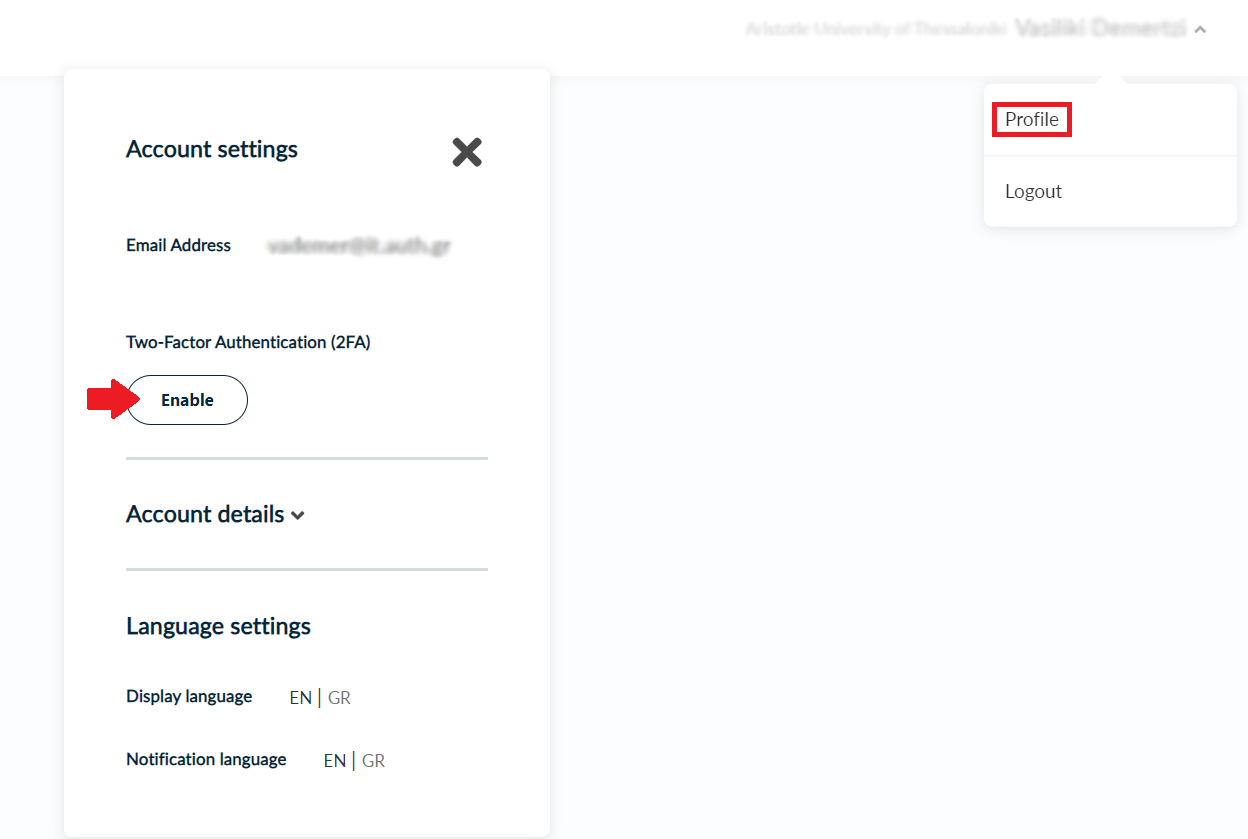
- Click your name in the top right corner and select Profile.
- Under Account Settings, click Enable and follow the on-screen instructions.
2FA is required before you can be granted a role or create an API key.
3. Get the appropriate Role
After the process is completed, please inform the Enterprise Manager or an already assigned Enterprise Admin of your Enterprise in order to grant you access as an Enterprise Admin or Enterprise Approver.
Specifically, there are three Enterprise Approver roles, which are Enterprise SSL Approver, Enterprise S/MIME Approver and Enterprise Client Auth Approver.
4. Create an API Key
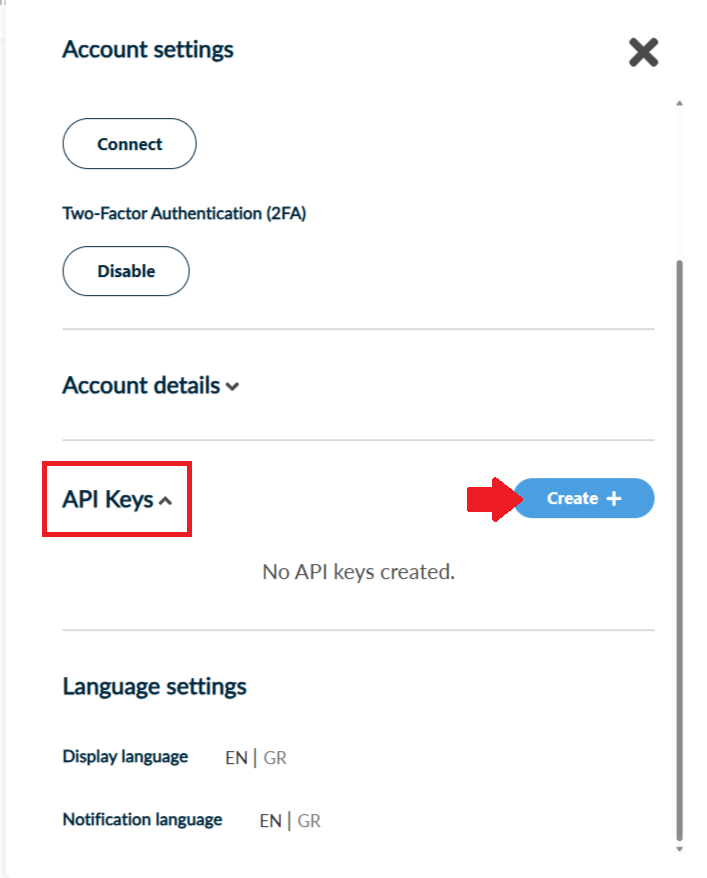
- Open Profile again. Once you have a role, the API key option is visible. Click Create.
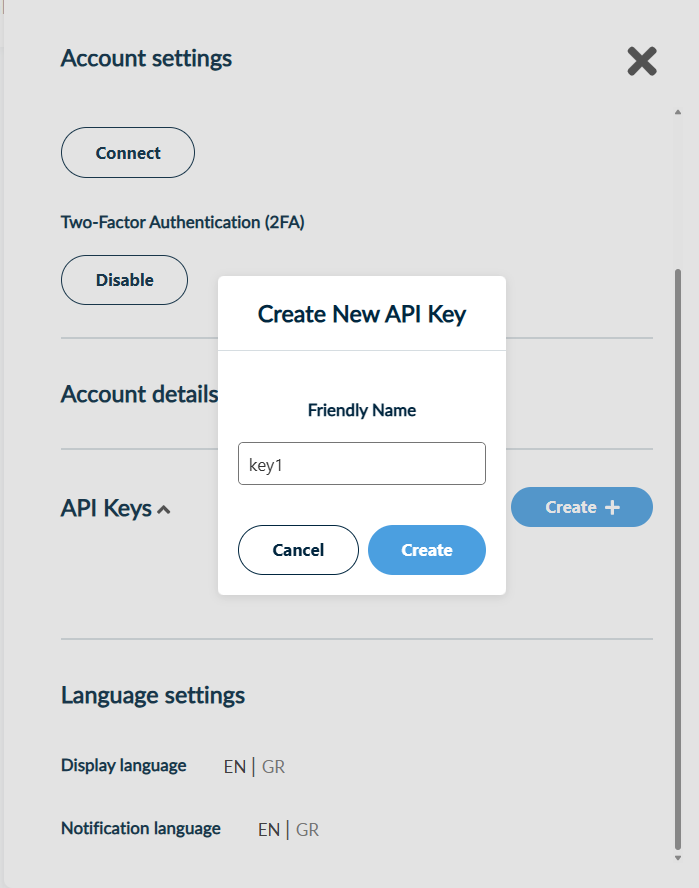
- Enter a friendly name for the key and click Create again.
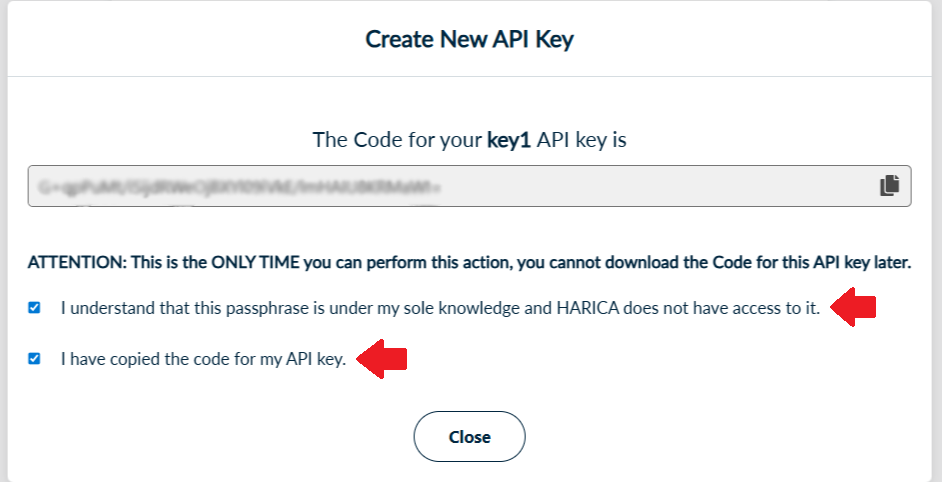
- Copy the key now. It is displayed only once and cannot be viewed again. Store it securely before you tick the confirmation boxes and close the dialog.
Each user can have a maximum of 3 API keys. Treat a key like a password: keep it out of source code and shared chats, and use a separate key per integration so you can tell them apart.
Requirements for every request
Every request needs a valid API key, a supported role, the base URL of your environment and the correct headers.
Role
Only users with the Enterprise Admin role or one of the Enterprise Approver roles (SSL, S/MIME, Client Authentication) can use the API. Access to an endpoint also depends on the role. For example, an Enterprise SSL Approver cannot act on S/MIME or Client Authentication certificates.
Base URL
| Environment | Base URL |
|---|---|
| Development | https://cm-dev.harica.gr |
| Staging | https://cm-stg.harica.gr |
| Production | https://cm.harica.gr |
Headers
| Header | Required for | Value |
|---|---|---|
| X-API-Key | Every request | Your API key |
| Content-Type | POST requests | multipart/form-data for file uploads (Bulk Issuance, Add domain). application/json for JSON bodies (all other POST requests). |
Responses
Responses are JSON. The only exception is a successful Bulk Issuance request, which returns a ZIP file. If Bulk Issuance fails, you receive a JSON object with the status and an error message.
Path parameters
Endpoints accept only predefined values in {action}, {type}, {status} and {field}. Any other value returns an error. If a value contains spaces (for example SSL DV), URL-encode it (SSL%20DV).
| Parameter | Endpoint | Allowed values |
|---|---|---|
| {type} | Bulk issuance | smime, clientauth |
| {type} | Approver requests, certificates and actions | ssl, smime, clientauth |
| {action} | Approver actions | accept, cancel, revoke |
| {type} | Admin revoke | ssl, smime, clientauth |
| {status} | Requests | Pending, Ready, Completed, Canceled |
| {status} | Certificates | Valid, Revoked, Expired |
Bulk certificate issuance
One POST request with a CSV file creates many S/MIME or Client Authentication certificates. Only users with the Enterprise Admin role can use this endpoint.
POST /cm/v1/bulk/create/{type}, where {type} is smime or clientauth.
Request
Send Content-Type: multipart/form-data and two form fields:
| Form field | Content |
|---|---|
| value | The organizationId of the domain entry you issue for. Use one of the organizationId values listed under your groupId in GET /cm/v1/admin/enterprises. |
| file | The CSV file with the certificate data. |
curl -X POST https://base-url/cm/v1/bulk/create/clientauth \
  -H "X-API-Key: YOUR_API_KEY" \
  -F "value=" \
  -F "file=@bulk_clientauth.csv" \
  -o P12Files.zip
Response
A successful request returns a ZIP file. If any error occurs, you receive JSON with the status and an error message instead.
| CSV contains a CSR? | ZIP name | Contents |
|---|---|---|
| No | P12Files.zip | .p12 files, one per row |
| Yes | CertificateFiles.zip | .p7b files with the certificates |
The FriendlyName of each row becomes the file name inside the ZIP, so keep it unique per row.
Client Authentication CSV (clientauth)
| Column | Required | Description |
|---|---|---|
| CommonName | Yes | The Common Name (CN) in the certificate's Subject DN |
| DNSname | No | DNS Subject Alternative Name (SAN) |
| FriendlyName | Yes | Internal label used as the filename of the certificate file inside the returned ZIP archive |
| OrganizationUnit1 | No | First Organizational Unit (OU) in the certificate's Subject DN |
| OrganizationUnit2 | No | Second Organizational Unit (OU) in the certificate's Subject DN |
| OrganizationUnit3 | No | Third Organizational Unit (OU) in the certificate's Subject DN |
| GivenName | No | First name of the certificate holder |
| Surname | No | Last name of the certificate holder |
| Yes | Email address of the certificate holder | |
| PickupPassword | No | Password used to encrypt the returned PKCS#12 (.p12) file |
| KeySpec | No | RSA key size: 2048, 3072 or 4096. For ECDSA, the curve: secp256r1 or secp384r1 |
| KeyAlg | No | Key algorithm: RSA or ECDSA |
| CertType | Yes | Certificate type: CLIENT_AUTHENTICATION_USER for personal or CLIENT_AUTHENTICATION_MACHINE for device certificates |
| Duration | Yes | The certificate validity period in days: 365, 730, or 1095 |
| CSR | No | A PEM certificate request, from -----BEGIN CERTIFICATE REQUEST----- to -----END CERTIFICATE REQUEST----- |
Examples
Client Authentication Bulk Request without CSRs (bulk_clientauth.csv):
CommonName,DNSname,FriendlyName,OrganizationUnit1,OrganizationUnit2,OrganizationUnit3,GivenName,Surname,Email,PickupPassword,KeySpec,KeyAlg,CertType,Duration,CSR
Test1,,test1,TestOU1,TestOU2,TestOU3,,,test@example.com,12345,2048,RSA,client_authentication_machine,365,
test.it.auth.gr,test.it.auth.gr,test2,TestOU4,TestOU5,TestOU6,,,test@example.com,12345,2048,RSA,client_authentication_machine,730,
James Smith,,test3,TestOU7,TestOU8,TestOU9,James,Smith,test@example.com, 12345,2048,RSA,client_authentication_user,1095,
Client Authentication Bulk Request with CSRs (bulk_clientauth_csr.csv):
The response is CertificateFiles.zip.
CommonName,DNSname,FriendlyName,OrganizationUnit1,OrganizationUnit2,OrganizationUnit3,GivenName,Surname,Email,PickupPassword,KeySpec,KeyAlg,CertType,Duration,CSR
Bob Dylan,,test1,TestOU1,TestOU2,TestOU3,Bob,Dylan,test@example.com,,,, client_authentication_user,365,"-----BEGIN CERTIFICATE REQUEST-----
MIIDiTCCAfECAQAwRDELMAkGA1UEBhMCR1IxDzANBgNVBAcTBkF0aGVuczEPMA0G
...your CSR content here...
-----END CERTIFICATE REQUEST-----"
Test1,,test1,TestOU1,TestOU2,TestOU3,,,test@example.com,12345,2048,RSA,client_authentication_machine,1095,"-----BEGIN CERTIFICATE REQUEST-----
...your CSR content here...
-----END CERTIFICATE REQUEST-----"
CertType values are case-insensitive. The examples use lowercase. Send the request to /cm/v1/bulk/create/clientauth.
S/MIME CSV (smime)
| Column | Required | Description |
|---|---|---|
| FriendlyName | Yes | Internal label used as the filename of the certificate file inside the returned ZIP archive |
| Yes | Primary email address of the certificate holder | |
| Email2 | No | Second email address included as an additional Subject Alternative Name |
| Email3 | No | Third email address included as an additional Subject Alternative Name |
| GivenName | No | First name of the certificate holder |
| Surname | No | Last name of the certificate holder |
| PickupPassword | No | Password used to encrypt the returned PKCS#12 (.p12) file |
| CertType | Yes | Certificate type: EMAIL_ONLY or NATURAL_LEGAL_LCP |
| CSR | No | A PEM certificate request, from -----BEGIN CERTIFICATE REQUEST----- to -----END CERTIFICATE REQUEST----- |
Examples
S/MIME Bulk Request without CSRs (bulk_smime.csv):
The response is P12Files.zip.
FriendlyName,Email,Email2,Email3,GivenName,Surname,PickupPassword,CertType,CSR
test1,test@example.com,,,,,12345,email_only,
test2,test@example.com,,,John,Smith,12345,natural_legal_lcp,
The response is a zip file with name P12Files.zip, containing all the .p12 files with the certificates.
S/MIME Bulk Request with CSRs (bulk_smime_csr.csv):
The response is CertificateFiles.zip.
FriendlyName,Email,Email2,Email3,GivenName,Surname,PickupPassword,CertType,CSR
test1,support@example.com,,,,,,email_only,"-----BEGIN CERTIFICATE REQUEST-----

...your CSR content here...
-----END CERTIFICATE REQUEST-----"
test2,test2@example.com,test2-alt@example.com,,Bob,Dylan,,natural_legal_lcp,"-----BEGIN CERTIFICATE REQUEST-----
...your CSR content here...
-----END CERTIFICATE REQUEST-----"
Send the request to /cm/v1/bulk/create/smime.
Get data
All endpoints in this section use GET and need only the X-API-Key header. Replace the placeholder values ({type}, {status}, {field}, {value}) as described in Path parameters.
Enterprise Approver
An Enterprise Approver can read the requests and certificates of the groups they approve for.
Requests
| Goal | Endpoint |
|---|---|
| All requests of a type (pending by default) | /cm/v1/enterprise/requests/{type} |
| Filter by status | /cm/v1/enterprise/requests/{type}/list/{status} |
| Filter by field | /cm/v1/enterprise/requests/{type}/{field}/{value} |
Valid fields: id and email for SSL; email, type and user for S/MIME and Client Authentication.
| Example | Endpoint |
|---|---|
| Pending SSL requests | /cm/v1/enterprise/requests/ssl/list/Pending |
| Ready S/MIME requests | /cm/v1/enterprise/requests/smime/list/Ready |
| Completed Client Authentication requests | /cm/v1/enterprise/requests/clientauth/list/Completed |
| Canceled Client Authentication requests | /cm/v1/enterprise/requests/clientauth/list/Canceled |
| SSL request by transaction id | /cm/v1/enterprise/requests/ssl/id/0f7d7ab0-b0ac-4577-bdc9-7c90ce361362 |
| Client Authentication requests by applicant email | /cm/v1/enterprise/requests/clientauth/email/jsmith@example.com |
The response is a list of objects like this one:
[
{
"transactionId": "11591573-ad24-41ce-ad57-54c3f602e5e4"
"transactionTypeName": "SSL OV",// certificate type
"transactionStatus":  "Pending",// current status of the request (pending,
                                                   // ready, completed, cancelled)
"transactionStatusMessage": "Waiting for enterprise approval",
"notes":  null,
"organization": "Example Organization S.A.",
"userEmail": "jsmith@example.com",  // email of the applicant
"userOrganization":  "Example Organization S.A.",  //applicant’s organization
"friendlyName":  "Production Web Certificate",
"reviewedBy": null,
           "isRevoked":  false,   // whether the certificate has been revoked
    "domains": [
  	{ "name": "example.com", "type": "DNS" },
  	{ "name": "www.example.com", "type": "DNS" }
	],
    "reviews": []
}
]
| Field | Meaning |
|---|---|
| transactionTypeName | Certificate type |
| transactionStatus | Pending, Ready, Completed or Canceled |
| userEmail, userOrganization | Email and organization of the applicant |
| isRevoked | Whether the certificate has been revoked |
Certificates
| Goal | Endpoint |
|---|---|
| All valid certificates of a type (pending by default) | /cm/v1/enterprise/certificates/{type} |
| Filter by status(Valid, Revoked, Expired) | /cm/v1/enterprise/certificates/{type}/list/{status} |
| Filter by field(valid certificates only) | /cm/v1/enterprise/certificates/{type}/{field}/{value} |
Valid fields: email type, user. type is the certificate type (transactionTypeName).
| Example | Endpoint |
|---|---|
| Valid S/MIME certificates | /cm/v1/enterprise/certificates/smime |
| Revoked SSL certificates | /cm/v1/enterprise/certificates/ssl/list/Revoked |
| Expired Client Authentication certificates | /cm/v1/enterprise/certificates/clientauth/list/Expired |
| S/MIME certificates by owner's email | /cm/v1/enterprise/certificates/smime/email/test@example.com |
Enterprise Admin
An Enterprise Admin can read enterprises, users, certificates and domain validations of their groups.
| Goal | Endpoint |
|---|---|
| Enterprises linked to your account (no filters) | /cm/v1/admin/enterprises |
| All users of your groups | /cm/v1/admin/users |
| Users filtered by email | /cm/v1/admin/users/email/{value} |
| Valid certificates (default) | /cm/v1/admin/certificates |
| Certificates by status (Valid, Revoked, Expired) | /cm/v1/admin/certificates/list/{status} |
| Valid certificates by field (serial, email, type) | /cm/v1/admin/certificates/{field}/{value} |
| Domain validations of a prevalidated organization (no filters) | /cm/v1/admin/validation/{groupId} |
| Example | Endpoint |
|---|---|
| Revoked certificates | /cm/v1/admin/certificates/list/Revoked |
| Expired certificates | /cm/v1/admin/certificates/list/Expired |
| By serial number | /cm/v1/admin/certificates/serial/2E27C1FF188A76FC6B07CF2AE28754EF |
| By owner's email | /cm/v1/admin/certificates/email/test@example.com |
GET Enterprises response
Each object describes one domain entry (organizationId) that belongs to an enterprise (groupId). Use groupId in the domain validation endpoint, and organizationId to validate, check or remove a domain. For Bulk Issuance, use organizationId as the value form field.
[
{
"organizationId": "c00f50b8-f375-437a-bf02-f18ecd8dea71",
    "domain": "example.edu",
    "organization": "Example College",
    "organizationLocalized": "",
    "country": "GR",
    "state": "Attica",
    "stateLocalized": "",
    "locality": "Athens",
    "localityLocalized": "",
    "organizationalUnit": "",
    "organizationalUnitLocalized": null,
    "dn": "O=Example College, ST=Attica, L=Athens, C=GR",
    "validity": "2025-01-20T07:06:31.258682",
    "groupId": "04eb0384-8b60-45f3-bfae-5d09e65e9749",
    "organizationIdentifier": null,
    "validityOV": "2025-01-20T07:06:31.258682",
    "validityEV": "2025-01-20T07:06:31.258684",
    "jurisdictionCountry": null,
    "jurisdictionState": null,
    "jurisdictionLocality": null,
    "businessCategory": null,
    "serial": null,
    "groupDomains": "example.edu"
}
]
GET Users response
[
{
"fullName": "Firstname Lastname",
    "email": "user@example.com",
    "organization": "Example College",
    "role": "User",
    "creationDateTime": "2021-09-22T09:27:47.54207",
    "groups": "",
    "id": "65f0f149-2fa8-4125-b3c8-f010b712d7bf",
    "enabled2FA": false,
    "isEmailConfirmed": true,
    "givenName": null,
    "surname": null
}
]
GET Certificates response
The response is a list of JSON objects, one per certificate. Filtering by field returns only certificates with status Valid.
GET Domain validations response
One object per domain of the selected group. validity is the expiry date of the domain validation.
[
{
"organizationId": "c00f50b8-f375-437a-bf02-f18ecd8dea71",
    "organizationName": "Example College",
    "domain": "example.edu",
    "validity": "2027-07-10T00:00:00"
}
]
Post data
These endpoints change data. Send the X-API-Key header and, unless stated otherwise, Content-Type: application/json.
Enterprise Approver
Accept, cancel or revoke
POST /cm/v1/enterprise/{action}/{type}
{action}is accept, cancel or revoke. {type} is ssl, smime or clientauth. You need the matching approver role: an Enterprise SSL Approver cannot act on S/MIME or Client Authentication certificates.
You can accept or cancel only requests with status Pending.
| Action | Body fields | Notes |
|---|---|---|
| accept | transactionId, message for ssl only | message is not used for smime and clientauth |
| cancel | transactionId, message, optional informUser | informUser (true or false) tells the requester about the cancellation |
| revoke | transactionId, message, value | value is the revocation reason code (see below) |
Revocation reason codes.Set value to the code of the reason for the revocation:
| Code | Reason |
|---|---|
| 4.9.1.1.1.1 | Unspecified reason |
| 4.9.1.1.1.3 | Private key is compromised |
| 4.9.1.1.1.5 | Private key is exposed |
| 4.9.1.1.1.12 | Information appearing in the Certificate is inaccurate |
| 4.9.1.1.1.13 | Subscriber no longer controls, or is no longer authorized to use, all of the Domain Names or email addresses in the Certificate |
| 4.9.1.1.1.14 | Website or email address is no longer in use |
| 4.9.1.1.1.17 | Existing Certificate has been replaced |
Accept an SSL request (POST /cm/v1/enterprise/accept/ssl):
{
"transactionId": "0f7d7ab0-b0ac-4577-bdc9-7c90ce361362",
"message": "Approved by the enterprise"
}
Accept an S/MIME request (POST /cm/v1/enterprise/accept/smime):
{
"transactionId": "0f7d7ab0-b0ac-4577-bdc9-7c90ce361362"
}
Cancel an SSL request (POST /cm/v1/enterprise/cancel/ssl):
{
  "transactionId": "0f7d7ab0-b0ac-4577-bdc9-7c90ce361362",
  "message": "Cancelled by the enterprise",
  "informUser": false
}
Cancel a Client Authentication request (POST /cm/v1/enterprise/cancel/clientauth):
{
  "transactionId": "0fad5685-edac-4ac6-8da2-e2753e5afef2",
  "message": "Cancelled by the enterprise",
  "informUser": true
}
Revoke a Client Authentication certificate (POST /cm/v1/enterprise/revoke/clientauth):
{
  "transactionId": "0fad5685-edac-4ac6-8da2-e2753e5afef2",
  "message": "Revoked by the enterprise",
  "value": "4.9.1.1.1.1"
}
Revoke an S/MIME certificate (POST /cm/v1/enterprise/revoke/smime):
{
  "transactionId": "9c13a3db-80a3-4a01-afbf-fcbf6fa02822",
  "message": "Revoked by the enterprise",
  "value": "4.9.1.1.1.1"
}
Enterprise Admin
Revoke a certificate
POST /cm/v1/admin/revoke/{type}
An Enterprise Admin can revoke certificates but cannot accept or cancel requests. The body has the same three fields as an approver revocation and uses the same reason codes (see Accept, cancel or revoke above). {type} is the type of the certificate to revoke: ssl, smime or clientauth.
Revoke an S/MIME certificate (POST /cm/v1/admin/revoke/smime):
{
  "transactionId": "9c13a3db-80a3-4a01-afbf-fcbf6fa02822",
  "message": "Revoked by the enterprise",
  "value": "4.9.1.1.1.1"
}
Revoke an SSL certificate (POST /cm/v1/admin/revoke/ssl):
{
  "transactionId": "0f7d7ab0-b0ac-4577-bdc9-7c90ce361362",
  "message": "Revoked by the enterprise",
  "value": "4.9.1.1.1.1"
}
Revoke a Client Authentication certificate (POST /cm/v1/admin/revoke/clientauth):
{
   "transactionId": "0fad5685-edac-4ac6-8da2-e2753e5afef2",
  "message": "Revoked by the enterprise",
  "value": "4.9.1.1.1.1"
}
Prevalidated organizations: domains
An Enterprise Admin can add, validate and remove domains of a prevalidated organization that they can access.
Add domains
POST /cm/v1/admin/domain/add with Content-Type: multipart/form-data.
| Form field | Content |
|---|---|
| groupId | Group id of the prevalidated organization, from GET /cm/v1/admin/enterprises |
| csv | CSV file with the domains to add. Maximum 100 domains per file. |
CSV file (new_domains.csv):
Domain
example.com
example.org
curl -X POST https:///cm/v1/admin/domain/add \ -H "X-API-Key: YOUR_API_KEY" \ -F "groupId= " \ -F "csv=@new_domains.csv"
If an error occurs, the response contains details about the problem.
Validate a domain
POST /cm/v1/admin/validation/domain with Content-Type: application/json.
| Field | Required | Content |
|---|---|---|
| usersEmail | For 3.2.2.4.7 and 3.2.2.4.4 | Email of the portal user who will validate the domain |
| validationMethodName | Yes | One of 3.2.2.4.7 (DNS Change), 3.2.2.4.4 (Constructed Email to Domain Contact) or 3.2.2.4.22 (DNS TXT Record with Persistent Value, see below) |
| organizationId | Yes | Id of the domain entry to validate, from GET /cm/v1/admin/validation/{groupId} |
| constructedAddress | Only for 3.2.2.4.4 | {prefix}@{domain to validate}. Allowed prefixes: admin, administrator, webmaster, hostmaster, postmaster |
Method 3.2.2.4.4, Constructed Email to Domain Contact. HARICA sends a validation email to the constructed address. The domain is validated when the recipient completes the steps in that email.
{
  "usersEmail": "validator@example.com",
  "validationMethodName": "3.2.2.4.4",
  "organizationId": "c00f50b8-f375-437a-bf02-f18ecd8dea71",
  "constructedAddress": "webmaster@example.com"
}
Method 3.2.2.4.7, DNS Change. Do not send constructedAddress.
{
  "usersEmail": "validator@example.com",
  "validationMethodName": "3.2.2.4.7",
  "organizationId": "c00f50b8-f375-437a-bf02-f18ecd8dea71"
}
The response contains the TXT value (for example HARICA-xxxxxxx), so you can read it directly from the API. Then:
- Publish the value as a TXT record in the DNS of the domain you are validating.
- Wait for the validation to complete.
- Check the result with GET /cm/v1/admin/validation/{groupId}.
HARICA looks for the TXT record for 30 days after the request.
Persistent TXT validation (3.2.2.4.22)
With method 3.2.2.4.22, DNS TXT Record with Persistent Value, you publish a TXT record once and keep it in DNS. HARICA checks the record automatically and renews the domain validation every 10 days for as long as the record exists. If you remove the record, the current validation stays valid until it expires and is not renewed. Removing the domain with /cm/v1/admin/domain/remove also stops the renewals.
- Request the record: POST /cm/v1/admin/validation/domain with method 3.2.2.4.22.
- Publish the TXT record from the response in the DNS of the domain.
- Check the domain: POST /cm/v1/admin/validation/check (see below).
- Leave the record in place so the validation keeps being renewed.
The request needs Content-Type: application/json. usersEmail and constructedAddress are not used with this method.
{
"validationMethodName": "3.2.2.4.22",
"organizationId": "c00f50b8-f375-437a-bf02-f18ecd8dea71"
}
The response describes the validation and contains the record to publish:
{ "validationTypeName": "3.2.2.4.22", "validationTypeAlias": "DNS TXT Record with Persistent Value", "usersEmail": "validator@example.com", "isValidated": false, "isLocked": false, "issuedAt": "2026-11-01T21:19:07Z", "validatedAt": null, "canCheckNow": true, "dnsRecordName": "", "dnsRecordValue": " " }
| Field | Meaning |
|---|---|
| validationTypeName,validationTypeAlias | Validation method and its name |
| usersEmail | Email of the user associated with the validation |
| isValidated | true once the domain has been validated |
| isLocked | Becomes true when the validation has stayed pending for 30 days |
| issuedAt | When the record was issued (UTC) |
| validatedAt | When the domain was validated (UTC) . null until then |
| canCheckNow | Whether you can run the check now. It can be false to prevent too many calls to the check endpoint. If true, publish the record and continue with Check a domain |
| dnsRecordName,dnsRecordValue | Name and value of the TXT record to publish |
Publish the record in the DNS of the domain, using the values from the response:
"dnsRecordName". IN TXT "dnsRecordValue"
Some DNS providers expect only the part of the name that is relative to your zone. Check how yours handles the name before you save the record.
Check a domain
POST /cm/v1/admin/validation/check with Content-Type: application/json. Use it with method 3.2.2.4.22 after the TXT record is published.
The body contains the organizationId of the domain entry, from GET /cm/v1/admin/validation/{groupId}:
{
"organizationId": "c00f50b8-f375-437a-bf02-f18ecd8dea71"
}
curl -X POST https:///cm/v1/admin/validation/check \
  -H "X-API-Key: YOUR_API_KEY" \
  -H "Content-Type: application/json" \
  -d '{"organizationId": "c00f50b8-f375-437a-bf02-f18ecd8dea71"}'
After a successful check, the response shows the domain and the latest validation. isValidated is true and canCheckNow is false. The example below uses sample dates:
{ { "organizationId": "c00f50b8-f375-437a-bf02-f18ecd8dea71", "organizationName": "Example Organization", "domain": "example.com", "validity": "2026-12-01T00:00:00", "latestValidation": { "validationTypeName": "3.2.2.4.22", "validationTypeAlias": "DNS TXT Record with Persistent Value", "usersEmail": "validator@example.com", "isValidated": true, "isLocked": false, "issuedAt": "2026-11-01T21:19:07Z", "validatedAt": "2026-11-01T21:40:11Z", "canCheckNow": false, "dnsRecordName": "", "dnsRecordValue": " " } }
Validity is the expiry date of the domain validation. Keep the TXT record in DNS after the check: HARICA keeps checking it automatically and renews the validation every 10 days for as long as it exists. If the check does not succeed, make sure the record is published with the exact name and value and has propagated, then run the check again.
Remove a domain
POST /cm/v1/admin/domain/remove with Content-Type: application/json.
This action disables the domain. It also stops the automatic renewals of the domain's validation.
 {
"organizationId": "c00f50b8-f375-437a-bf02-f18ecd8dea71"
}
The organizationId identifies the domain entry to disable and comes from GET /cm/v1/admin/validation/{groupId}.


